
|
Sales |
||
|
Information |
||
| Ordering | ||
| Creating Timetables | ||
| Conditions of Use | ||
|
|
||
|
|

Installation Help
Please note : We now have a Tutorial Video on our Youtube channel covering this process.
This can be found at https://youtu.be/6I8ZcLBLtyw
-
Please don't use the pcrail simulation folders for saving the file. For some reason this doesn't allow the timetable to import.
-
Please keep copies of your original timetable files in case you may change your PC or have problems with your hardware etc.
NOTE : Timetables are imported using the WTT Import facility on the actual simulation, not the import on PC-Rail Plus.
Before installing timetables please ensure you are running the latest version of the appropriate simulation. Please check the upgrade page for these. thankyou.
Your timetable(s) will normally be supplied to you via the download page, example as below.
However, if they have been supplied later via e.mail please ignore this part and go straight to 'Importing the File' section.
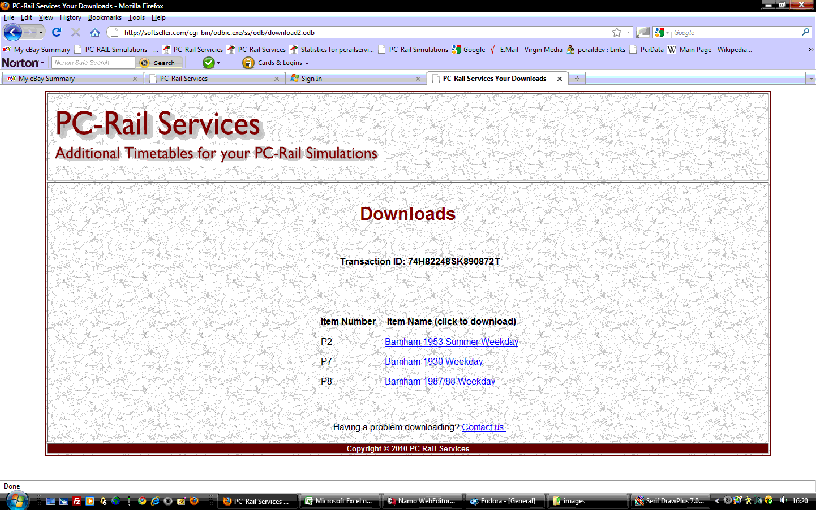
This will be shown either at the end of your order when payment has been made, or though the e.mail sent to you. If you use the e.mail link you will need to enter your e.mail address which must be the same as the one used to make the purchase.
Simply click on the timetable link to download your timetable to a temporary or suitable folder - but remember where!
Note
IMPORTING THE FILE
Now you need to "import" the file and use it. Please do not extract the files into the PC-Rail folder as any starting positions, if applicable, will not be shown.
Start your simulation, in this example the Rugby Simulation.
Locate the top menu [FILE] then select [WTT IMPORT]
You should then see a screen like the following :
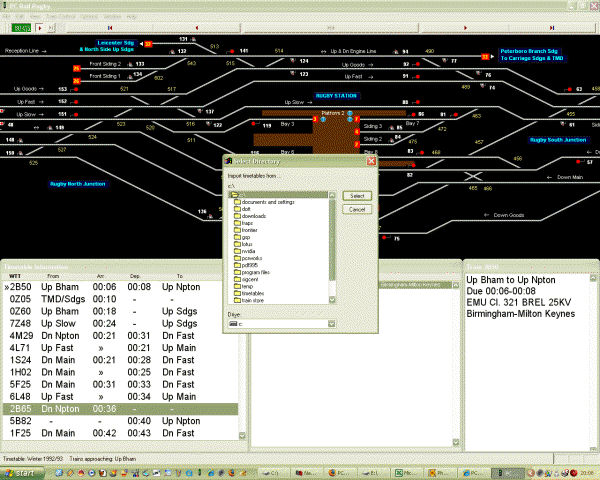
The default location is your downloads folder usually located on drive C. However, the system will remember the last location used. Example shown below is using the downloads folder.
Open this folder (if not already open). You should see a screen similar to the following:
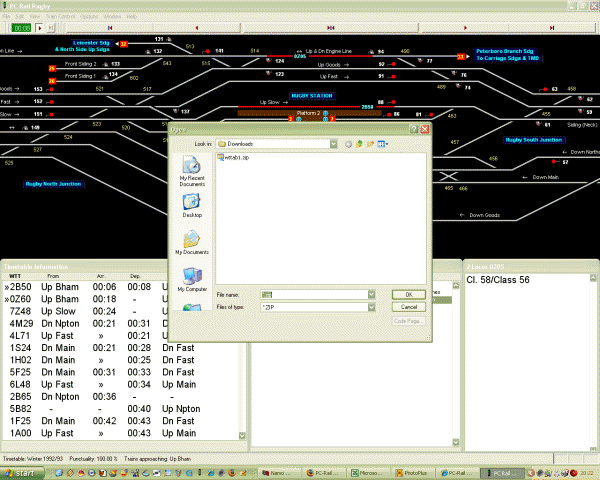
You can see the file wttab1.zip in the folder. If you have previously downloaded other files they may also be shown.
Click on the file wttab1.zip and select [OK]. The following screen should then be shown :

The timetable has then been imported to your simulation.
To use the timetable select the menu [File] then [New]. The following screen should be shown :
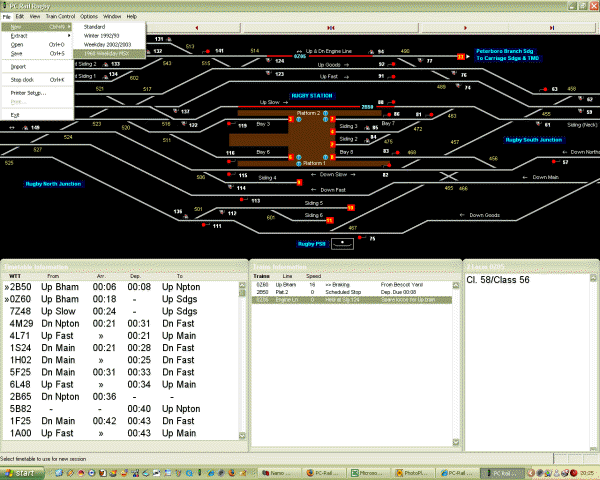
Move the mouse to the new timetable. 1968 Weekday MSX and your new timetable will now be in use.
Copyright © 2023 PC-Rail Services